Stay in your project
Swap faces right inside Photoshop, without exporting files or switching tools.
Select a face, click Swap! and get the result on a new, editable layer. The Picsi.Ai plugin comes with every paid plan.
Version 0.0.2 · .ccx file · Photoshop 2022 or later
Double-click the .ccx file and Adobe Creative Cloud installs the plugin.
Use the Discord account linked to your paid Picsi.Ai membership.
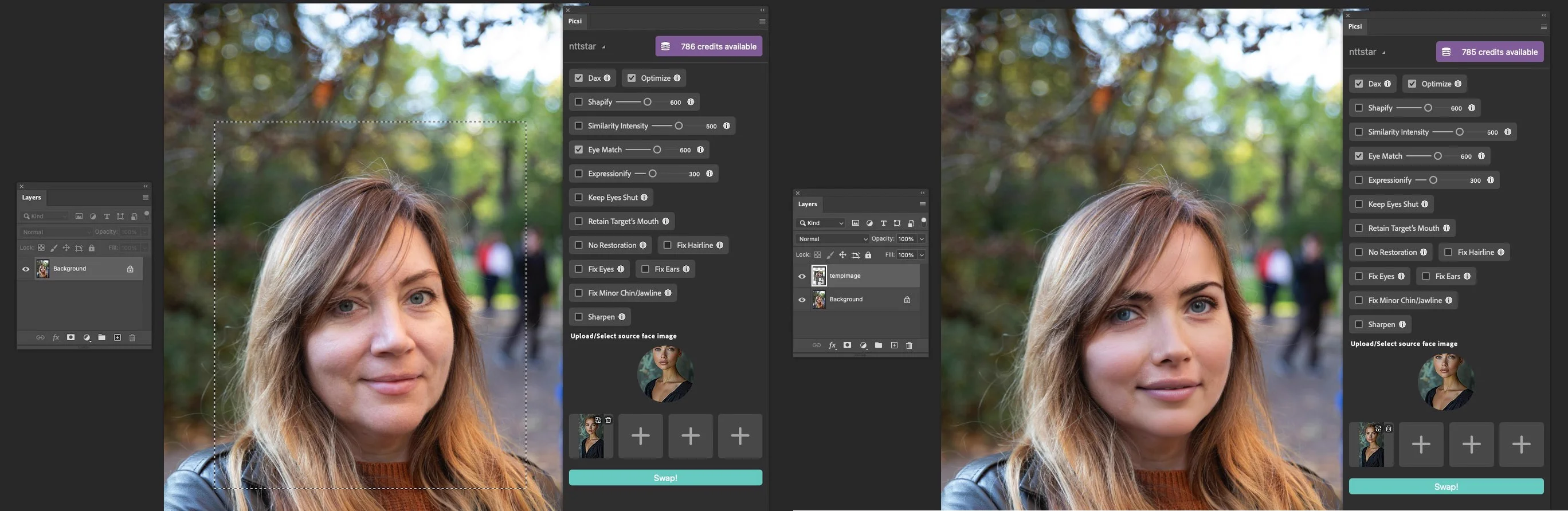
Click Upload Source Face and choose the face you want to use.
Draw a box around the face with the Rectangular Marquee Tool, then click Swap!
Swap faces right inside Photoshop, without exporting files or switching tools.
Every swap is a new editable layer, so your edits stay non-destructive.
Dax, Optimizer, Shapify, Eye Match, Expressionify and the fixes for eyes, ears, chin and hairline, in one clean panel.
Available to every paid member, on the Basic, Pro and Ultra plans.
Photoshop 2022 and later. The plugin has been tested with Photoshop 2025 on macOS and Windows.
Please follow our Terms of Use when using the plugin: no NSFW or unauthorized content.
The Photoshop plugin comes with every paid plan, along with more daily credits and multi-face swaps.